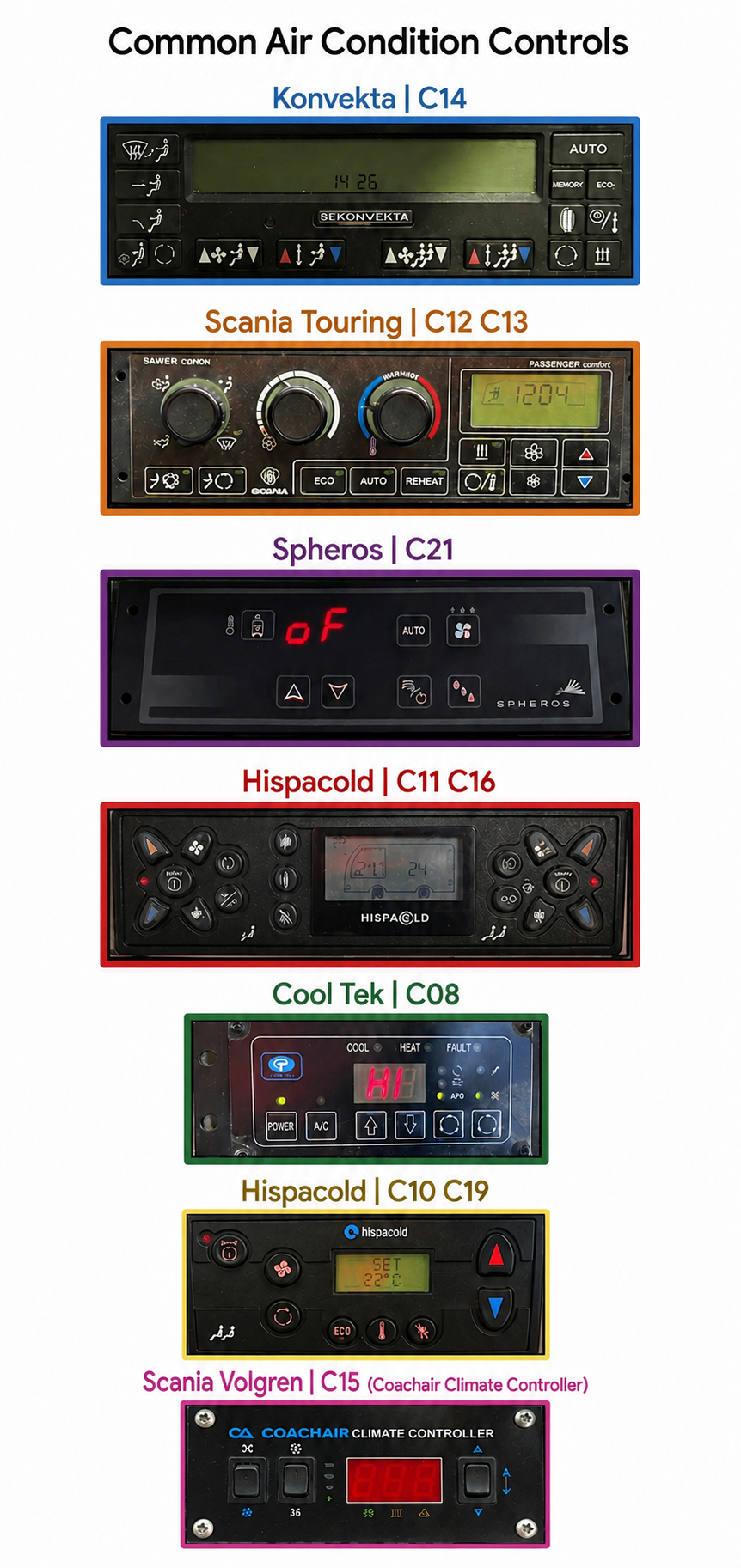
Panorama buses have several types of air conditioner controls.
Use the reference below to familiarise yourself with some of the possible air conditioner controls that you might encounter.
Common Air Condition Controls
1. Konvekta / C14
Automatic Mode
Press the AUTO button to let the system automatically manage temperature and fan speed.
Temperature Adjustment
Use the Up/Down arrow pairs across the bottom row to adjust target temperatures for the cabin zones Driver / Passenger .
▲ Temp increases temperature.
▼ Temp decreases temperature.
Air Distribution
Use the left-hand vertical buttons to choose where the air flows (e.g., windshield defrost, face level, or floor level).
REHEAT
Press to run the air conditioning and heating simultaneously to dehumidify the air and clear foggy windows quickly.
ECO
Activates an energy-saving mode, which optimizes compressor usage.
Fresh Air / Recirculation
Use the circular arrow buttons to toggle between bringing in outside fresh air or recirculating cabin air.
Auxiliary Heating
The button with the three wavy vertical lines activates the auxiliary heater (booster heat for very cold days).
2. Scania Touring / C12 C13
System Note: This panel is split into Driver Control (analog dials on the left) and Passenger Control (digital display and buttons on the right).
Driver Air Distribution (Left Dial): Rotate to change air direction (dash vents, floor, or windshield defrost).
Driver Fan Speed (Middle Dial): Rotate clockwise to increase driver-area fan speed.
Driver Temperature (Right Dial): Rotate into the blue zone for cooler air, or the red zone for warmer air.
Driver Defrost: Turn the left dial all the way to the right.
Passenger AUTO: Press to automatically control the passenger cabin climate.
Passenger ECO / REHEAT: Press ECO for fuel savings or REHEAT for rapid window dehumidification.
Passenger Fan Speed: Use the Fan icon button to step through passenger fan speeds manually.
Passenger Temperature: Use the red Up (▲) and blue Down (▼)arrows to change the passenger zone temperature setpoint shown on the LCD.
3. Spheros / C21
Power: The unit activates with the vehicle ignition. If it reads oF (Off), use the main control buttons to wake the system by pressing the Auto button or the Fan 123 button
Temperature Adjustment: Press the Up (▲) or Down (▼) arrow buttons in the center to raise or lower the cabin temperature.
AUTO: Press to allow the unit to regulate fan speed and temperature automatically.
Manual Fan Speed: Press the Fan button (with 1, 2, 3 indicators) to manually cycle through low, medium, and high fan speeds.
Fresh Air / Recirculation: Press the button with the car/arrow icon to switch between fresh outside air and inside air recirculation.
Dehumidify: Press the button with the three water droplets to activate the auxiliary AC dehumidification mode.
4. Hispacold / C11 C16
Power: Press the Auto/I central button on either side to activate the respective zones.
Automatic Climate: Pressing AUTO allows the system to monitor sensors and adjust the fans and mixing flaps dynamically.
Temperature Adjustment: Use the Red (▲) and Blue (▼) arrows on either side to increase or decrease temperatures for that zone.
Fan Speed: Press the upper and lower Fan Icons within the clusters to manually ramp fan speeds up or down.
Air Distribution: Use the footwell or upper body vent icons to direct air to the floor or face levels.
ECO: Located on the lower left of the center screen, press this to run the system in economy mode.
5. Cool Tek / C08
Power: Press the POWER button to turn the system on or off.
Air Conditioning: Press the A/C button to manually engage or disengage the cooling compressor.
Temperature Adjustment: Use the Up (▲) and Down (▼) arrow buttons to change the temperature. The digital readout will display your set temperature.
Status Lights: Watch the LED indicators above the screen:
COOL: Illuminates when system is actively cooling.
HEAT: Illuminates when system is actively heating.
FAULT: Lights up if there is a system malfunction.
AUTO Fan: Press the button with the circular arrows next to "AUTO" to let the system control fan speeds.
Manual Fan / Vent: Use the surrounding selection buttons to adjust vent choices or cycle air intake modes manually.
6. Hispacold / C10 C19
Power / Auto: Press the top-left Auto O/I button to power on the system in automatic mode.
Temperature Adjustment: Press the large Red Up Arrowto make the cabin warmer, or the Blue Down Arrowto make it cooler. The target temperature will display on the screen (e.g., SET 22°C).
Fan Speed: Press the Fan button to override automatic mode and manually cycle through fan speeds.
Recirculation: Press the Circular Arrow button to toggle between fresh air and recirculated cabin air.
ECO Mode: Press the ECO button to optimize the system for lower fuel consumption.
System Activation: This unit typically powers up with the master bus accessory switch.
Top/Left Rocker (Fan Mode): Flip up toward the Propeller (X) icon to run the ventilation fans manually. Flip down toward the Snowflake (*) icon to engage the cooling compressor.
Middle Rocker (Fan Speed): Flip up for High Speed (large propeller icon). Flip down for Low Speed / Off (small propeller / X icon).
Right Rocker (Temperature Toggle): Press and hold Up (▲) to increase the heat setpoint. Press and hold Down (▼) to decrease the temperature setpoint.
LED Display: The red digital center screen displays the current cabin temperature or target temperature setpoint.